《Lua OS库深度解析:操作系统级权限与安全实践》
上课日期:2025年3月26日
上课时间:晚上9:12
上课时长:46分钟39秒
一、课程核心内容概述
这节课是Lua OS库的高级权限操作课程,重点讲解了操作系统级别的函数调用、文件系统操作、系统命令执行等高风险高权限功能。通过实际演示深入理解了系统级权限的安全风险和合理使用的边界。
二、课程时间线梳理
0-10分钟:时间函数进阶
- 时间差计算 - diffime函数的实际应用
- 时间戳处理 - 活动时间计算与判断
- 夏令时检测 - 国际化时间处理
10-25分钟:系统命令执行(高风险)
- 程序启动 - 计算器、记事本等外部程序调用
- 文件操作 - 创建、删除、移动文件和目录
- 系统控制 - 关机、重启等危险操作演示
- 信息获取 - IP配置、系统信息收集
25-35分钟:文件系统操作
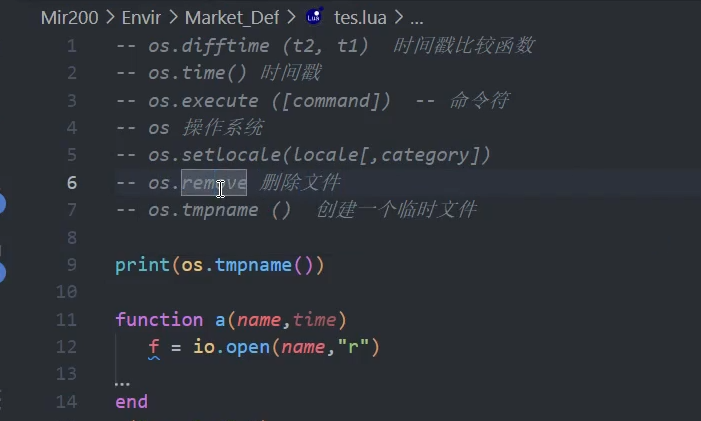
- 文件删除 - remove函数的安全使用
- 重命名操作 - 文件目录的重命名技巧
- 临时文件 - 临时文件的创建与管理
35-46分钟:系统环境控制
- 区域设置 - 多语言国际化支持
- 环境变量 - 系统环境信息的读取
- 安全边界 - 高权限函数的安全使用规范
三、重点技术难点解析
1. 时间处理高级技巧
时间差计算的实际应用
-- 活动倒计时计算
function CalculateRemainingTime(eventTime)
    local currentTime = os.time()
    local diff = os.difftime(eventTime, currentTime)

    if diff > 0 then
        local days = math.floor(diff / 86400)
        local hours = math.floor((diff % 86400) / 3600)
        local minutes = math.floor((diff % 3600) / 60)
        return string.format("活动剩余: %d天%d小时%d分钟", days, hours, minutes)
    else
        return "活动已开始"
    end
end

-- 使用示例
local eventTime = os.time({year=2024, month=12, day=25, hour=0, min=0, sec=0})
print(CalculateRemainingTime(eventTime))
夏令时与国际化时间
-- 检测是否处于夏令时
function IsDaylightSavingTime()
    return os.date("*t").isdst
end

-- 国际化时间格式
function FormatInternationalTime()
    -- 设置区域为美国英语
    os.setlocale("en_US.UTF-8")
    local usTime = os.date("%c")

    -- 设置区域为中国中文
    os.setlocale("zh_CN.UTF-8")
    local cnTime = os.date("%c")

    return usTime, cnTime
end
2. 系统命令执行的安全实践
安全的命令执行框架
-- 安全的命令执行函数
function SafeExecute(command, timeout)
    -- 命令白名单验证
    local allowedCommands = {
        "calc.exe",     -- 计算器
        "notepad.exe",  -- 记事本
        "cmd /c dir"    -- 目录列表
    }

    local isAllowed = false
    for _, cmd in ipairs(allowedCommands) do
        if command:find(cmd, 1, true) then
            isAllowed = true
            break
        end
    end

    if not isAllowed then
        return false, "命令不在白名单中"
    end

    -- 执行命令
    local result = os.execute(command)
    return true, result
end

-- 使用示例
local success, msg = SafeExecute("calc.exe")
if success then
    print("命令执行成功")
else
    print("执行失败:", msg)
end
系统信息的安全收集
-- 安全的系统信息收集
function CollectSafeSystemInfo()
    local info = {}

    -- 基本系统信息
    info.timestamp = os.time()
    info.locale = os.setlocale()

    -- 安全的网络信息(示例)
    info.network = "仅收集必要信息"

    return info
end
3. 文件操作的安全规范
临时文件的安全管理
-- 临时文件管理器
local TempFileManager = {}

function TempFileManager.CreateTempFile(content)
    local tempName = os.tmpname()
    local file = io.open(tempName, "w")
    if file then
        file:write(content)
        file:close()
        return tempName
    end
    return nil
end

function TempFileManager.CleanupTempFile(filename)
    if filename and os.remove(filename) then
        print("临时文件已清理:", filename)
    end
end

-- 使用示例
local tempFile = TempFileManager.CreateTempFile("临时数据")
-- ... 使用临时文件 ...
TempFileManager.CleanupTempFile(tempFile)  -- 及时清理
安全的文件操作
-- 安全的文件删除
function SafeFileRemove(filename)
    -- 路径安全检查
    if not filename:match("^[%w%._-/]+$") then
        return false, "非法文件名"
    end

    -- 文件存在性检查
    local file = io.open(filename, "r")
    if not file then
        return false, "文件不存在"
    end
    file:close()

    -- 执行删除
    return os.remove(filename)
end
四、安全使用规范与最佳实践
1. 权限最小化原则
命令执行限制
-- 严格的命令白名单
local CommandWhitelist = {
    -- 仅允许安全的系统工具
    "calc.exe" = "计算器",
    "notepad.exe" = "记事本",
    "mspaint.exe" = "画图工具"
}

function StrictCommandExecute(command)
    if not CommandWhitelist[command] then
        error("不允许执行的命令: " .. command)
    end
    return os.execute(command)
end
文件路径验证
-- 安全的路径验证
function ValidateFilePath(path)
    -- 禁止上级目录访问
    if path:find("%.%.") then
        return false, "禁止访问上级目录"
    end

    -- 限制特定目录
    local allowedDirs = {
        "/temp/",
        "/cache/",
        "/logs/"
    }

    for _, dir in ipairs(allowedDirs) do
        if path:sub(1, #dir) == dir then
            return true
        end
    end

    return false, "目录不在允许列表中"
end
2. 资源清理与内存管理
自动资源清理
-- 使用finally模式确保资源释放
function WithTempFile(content, callback)
    local tempFile = os.tmpname()
    local file = io.open(tempFile, "w")

    if not file then
        error("无法创建临时文件")
    end

    -- 写入内容
    file:write(content)
    file:close()

    -- 执行回调
    local success, result = pcall(callback, tempFile)

    -- 清理资源
    os.remove(tempFile)

    if not success then
        error(result)
    end

    return result
end
3. 错误处理与日志记录
完整的错误处理框架
-- 安全执行包装器
function SafeOSOperation(operation, ...)
    local startTime = os.time()
    local success, result = pcall(operation, ...)
    local endTime = os.time()

    -- 记录操作日志
    local logEntry = {
        operation = operation,
        success = success,
        duration = os.difftime(endTime, startTime),
        timestamp = os.date("%Y-%m-%d %H:%M:%S")
    }

    if not success then
        logEntry.error = result
        -- 记录错误日志
        WriteSecurityLog("OS_OPERATION_ERROR", logEntry)
    end

    return success, result
end

-- 使用示例
local ok, msg = SafeOSOperation(os.execute, "calc.exe")
五、实际应用场景
1. 游戏中的合法应用
截图工具集成
-- 安全的截图功能
function SafeScreenshot()
    -- 使用系统截图工具
    return SafeOSOperation(os.execute, "snippingtool.exe")
end
日志文件管理
-- 自动日志归档
function ArchiveOldLogs()
    local currentTime = os.time()
    local thirtyDaysAgo = currentTime - (30 * 24 * 60 * 60)  -- 30天前

    -- 查找并归档旧日志文件
    -- ... 实现文件遍历和日期比较 ...
end
2. 系统维护工具
自动备份系统
-- 简单的备份功能
function CreateBackup(sourceDir, backupDir)
    local timestamp = os.date("%Y%m%d_%H%M%S")
    local backupName = backupDir .. "/backup_" .. timestamp

    -- 创建备份命令
    local command = string.format('xcopy "%s" "%s" /E /I', sourceDir, backupName)
    return SafeOSOperation(os.execute, command)
end
六、安全警告与责任声明
⚠️ 重要安全警告
- 法律风险:未经授权的系统操作可能违反计算机安全法规
- 道德责任:开发者有责任保护用户系统和数据安全
- 技术风险:错误的系统操作可能导致系统崩溃或数据丢失
合法使用原则
- 用户知情:所有系统操作必须获得用户明确同意
- 最小权限:只请求执行必要功能的最小权限
- 透明操作:向用户清晰说明程序将执行的操作
- 可逆操作:确保所有操作都有恢复方案
开发建议
-- 始终使用安全包装器
function EthicalOSUsage()
    -- 1. 获取用户授权
    if not GetUserConsent("需要访问系统计算器") then
        return false, "用户拒绝授权"
    end

    -- 2. 限制操作范围
    local allowed = SafeOSOperation(os.execute, "calc.exe")

    -- 3. 记录操作日志
    LogUserAction("启动计算器")

    return allowed
end
这节课深入讲解了Lua OS库的强大功能和相应的安全风险,强调了负责任的编程实践。掌握这些技术的同时,必须时刻牢记安全第一的原则,确保代码既强大又安全!







 系统函数
系统函数